
Set severity and first-review targets
Open Severity & review
Section titled “Open Severity & review”- Open Command → Safeguarding.
- Select Severity & review.
- Review the current target for each severity level.
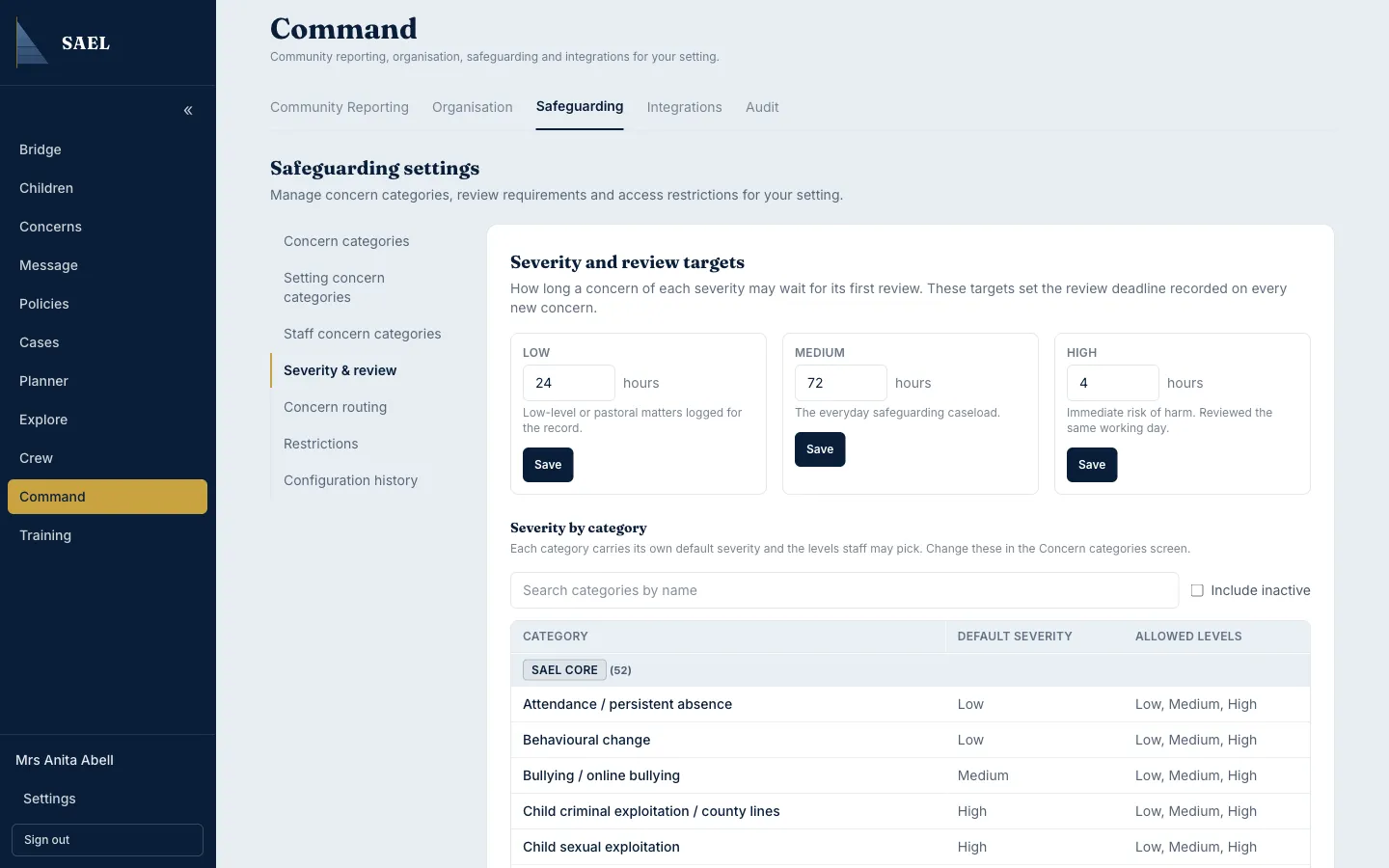
The initial defaults in SAEL are 168 hours for Low, 72 hours for Medium and 4 hours for High. These are setting configuration defaults, not statutory deadlines or a substitute for your safeguarding policy.
Change a review target
Section titled “Change a review target”- Find the severity you need to change.
- Enter the new target in hours.
- Keep the value between 1 and 720 hours. Values outside this range cannot be saved.
- Select Save on that severity row.
- Wait for the saved confirmation and check that the target is displayed as intended.
- Repeat separately for another severity if required; each severity has its own Save control.
Review category defaults as well
Section titled “Review category defaults as well”The lower part of the page shows severity by category. Review each category’s default severity and the severity levels staff may choose. If a category is configured to allow only certain severities, staff cannot choose a level outside that list when logging a new concern.
A review target is used for the first review deadline recorded on new concerns. Changing a target should therefore be treated as a safeguarding configuration change: agree it with the appropriate lead, understand its operational impact and check the configuration history afterwards.